Softpress

Prevent Rollovers with no Links from Jumping to the Top of the Page

Items with Rollovers applied to them but no links on them will automatically have a dummy link (#) applied to them. When these dummy links are clicked the browser skips to the top of the page. This means any target triggered galleries at the bottom of long pages are become useless. To stop this from happening select the item with the Rollover applied to it and open the Hyperlink dialog by pressing Command-k and in the field in the center of the External pane select "javascript:" from the Protocol pulldown and click Ok.
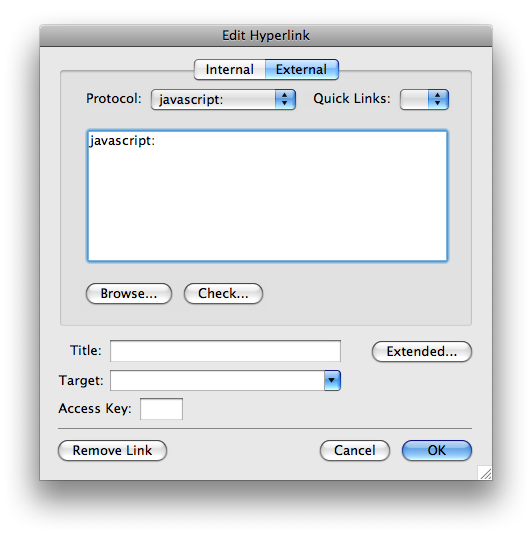
You will now be able to select this blank JavaScript link from the quicklink area at the bottom of the Freeway window.


Related Articles

Attachments

No attachments were found.

Article Details

Last Updated
25th of September, 2008

Would you like to...

Print this page  Print this page

Email this page  Email this page

Post a comment  Post a comment

 Subscribe me

Subscribe me  Add to favorites

Remove Highlighting Remove Highlighting

Edit this Article

Quick Edit

Export to PDF


User Opinions

100% thumbs up 0% thumbs down (2 votes)

How would you rate this answer?


Thank you for rating this answer.

Continue